Tampilkan postingan dengan label ubuntu. Tampilkan semua postingan

13 Juni 2023

Popeyes Goes Open Source (Ubuntu)


There's a new option at Popeyes: "Software Updater."


I have no idea how it tastes, so I ordered (installed) it!


Too long to wait!


DISCLAIMER


This is HOW Me Do IT! Grrr... this blog memo is mainly written for OWN PURPOSES. This post is based on "Google Here, There, and Everywhere". Whether this is PLAGIARY or RESEARCH, there has never been a claim that this is an original work, nor is it necessarily the best solution, and not for Scopus consumption :). Please provide feedback, especially if you have alternative explanations. Hopefully, this note will be helpful in the future when you have forgotten how to solve this trivia problem.


DISKLAIMER


INIlah yang KUlakukan! Grrr... memo blog ini terutama ditulis untuk KEPERLUAN SENDIRI. Tulisan ini berbasis "Google Sana, Google Sini, Coba Itu, Coba Ini, Lalu Tanya-tanyi". Entah ini PLAGIAT, entah ini RISET, yang jelas tidak pernah ada klaim bahwa ini merupakan karya asli, serta belum tentu pula merupakan solusi terbaik, serta bukan untuk konsumsi Scopus :). Mohon kiranya memberikan tanggapan, terutama jika memiliki solusi alternatif. Semoga catatan ini akan bermanfaat di masa mendatang, saat sudah lupa cara menyelesaikan masalah trivia ini.

This is the Way!

27 Juni 2022

Your Hardware Enablement Stack (HWE)

Your Hardware Enablement Stack (HWE)

is supported until April 2025.

No idea, but according to GSGS (Google Sana Google Sini):

 
hwe-support-status --verbose


produces it.

URLs


DISCLAIMER


This is HOW Me Do IT! Grrr... this blog memo is mainly written for OWN PURPOSES. This post is based on "Google Here, There, and Everywhere". Whether this is PLAGIARY or RESEARCH, there has never been a claim that this is an original work, nor is it necessarily the best solution, and not for Scopus consumption :). Please provide feedback, especially if you have alternative explanations. Hopefully, this note will be helpful in the future when you have forgotten how to solve this trivia problem.


DISKLAIMER


INIlah yang KUlakukan! Grrr... memo blog ini terutama ditulis untuk KEPERLUAN SENDIRI. Tulisan ini berbasis "Google Sana, Google Sini, Coba Itu, Coba Ini, Lalu Tanya-tanyi". Entah ini PLAGIAT, entah ini RISET, yang jelas tidak pernah ada klaim bahwa ini merupakan karya asli, serta belum tentu pula merupakan solusi terbaik, serta bukan untuk konsumsi Scopus :). Mohon kiranya memberikan tanggapan, terutama jika memiliki solusi alternatif. Semoga catatan ini akan bermanfaat di masa mendatang, saat sudah lupa cara menyelesaikan masalah trivia ini.

This is the Way!

13 Juni 2022

Ubuntu Gnome: Stop Screen Dimming

Ubuntu Gnome:

Stop Screen Dimming


What are your idle-dim setting?

 
gsettings get org.gnome.settings-daemon.plugins.power idle-dim
gsettings get org.gnome.settings-daemon.plugins.power idle-brightness


Set/Delete your idle-dim setting!

 
gsettings set org.gnome.settings-daemon.plugins.power idle-dim false
gsettings set org.gnome.settings-daemon.plugins.power idle-brightness 3600


DISCLAIMER


This is HOW Me Do IT! Grrr... this blog memo is mainly written for OWN PURPOSES. This post is based on "Google There, Google Here, Try That, Try This, Then Ask". Whether this is PLAGIARY or RESEARCH, there has never been a claim that this is an original work, nor is it necessarily the best solution, and not for Scopus consumption :). Please provide feedback, especially if you have alternative explanations. Hopefully, this note will be helpful in the future when you have forgotten how to solve this trivia problem.


DISKLAIMER


INIlah yang KUlakukan! Grrr... memo blog ini terutama ditulis untuk KEPERLUAN SENDIRI. Tulisan ini berbasis "Google Sana, Google Sini, Coba Itu, Coba Ini, Lalu Tanya-tanyi". Entah ini PLAGIAT, entah ini RISET, yang jelas tidak pernah ada klaim bahwa ini merupakan karya asli, serta belum tentu pula merupakan solusi terbaik, serta bukan untuk konsumsi Scopus :). Mohon kiranya memberikan tanggapan, terutama jika memiliki solusi alternatif. Semoga catatan ini akan bermanfaat di masa mendatang, saat sudah lupa cara menyelesaikan masalah trivia ini.

Qapla!

Ubuntu LibreOffice Warning: failed to launch javaldx - java may not function correctly

Ubuntu LibreOffice Warning

failed to launch javaldx - java may not function correctly


Install


sudo apt install -y libreoffice-java-common


DISCLAIMER


This is HOW Me Do IT! Grrr... this blog memo is mainly written for OWN PURPOSES. This post is based on "Google Here, There, and Everywhere". Whether this is PLAGIARY or RESEARCH, there has never been a claim that this is an original work, nor is it necessarily the best solution, and not for Scopus consumption :). Please provide feedback, especially if you have alternative explanations. Hopefully, this note will be helpful in the future when you have forgotten how to solve this trivia problem.


DISKLAIMER


INIlah yang KUlakukan! Grrr... memo blog ini terutama ditulis untuk KEPERLUAN SENDIRI. Tulisan ini berbasis "Google Sana, Google Sini, Coba Itu, Coba Ini, Lalu Tanya-tanyi". Entah ini PLAGIAT, entah ini RISET, yang jelas tidak pernah ada klaim bahwa ini merupakan karya asli, serta belum tentu pula merupakan solusi terbaik, serta bukan untuk konsumsi Scopus :). Mohon kiranya memberikan tanggapan, terutama jika memiliki solusi alternatif. Semoga catatan ini akan bermanfaat di masa mendatang, saat sudah lupa cara menyelesaikan masalah trivia ini.

This is the Way!

21 April 2022

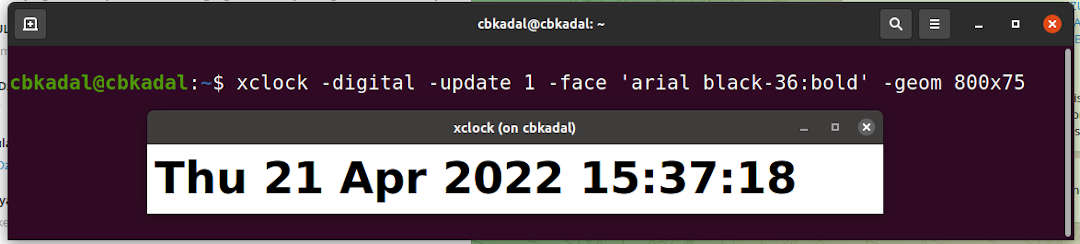
Linux Digital XCLOCK

The standard X11 clock for GNU/Linux is "xclock". On Ubuntu or Debian, the deb package name is "x11-apps."

To launch the xclock, just run:

 
xclock


To launch a digital xclock, just run:

 
xclock -digital


To enlarge the font size of the digital xclock, just run:


xclock -digital -update 1 -face 'arial black-36:bold' -geom 800x77 


DISCLAIMER


This is HOW Me Do IT! Grrr... this blog memo is mainly written for OWN PURPOSES. This post is based on "Google Here, There, and Everywhere". Whether this is PLAGIARY or RESEARCH, there has never been a claim that this is an original work, nor is it necessarily the best solution, and not for Scopus consumption :). Please provide feedback, especially if you have alternative explanations. Hopefully, this note will be helpful in the future when you have forgotten how to solve this trivia problem.


DISKLAIMER


INIlah yang KUlakukan! Grrr... memo blog ini terutama ditulis untuk KEPERLUAN SENDIRI. Tulisan ini berbasis "Google Sana, Google Sini, Coba Itu, Coba Ini, Lalu Tanya-tanyi". Entah ini PLAGIAT, entah ini RISET, yang jelas tidak pernah ada klaim bahwa ini merupakan karya asli, serta belum tentu pula merupakan solusi terbaik, serta bukan untuk konsumsi Scopus :). Mohon kiranya memberikan tanggapan, terutama jika memiliki solusi alternatif. Semoga catatan ini akan bermanfaat di masa mendatang, saat sudah lupa cara menyelesaikan masalah trivia ini.

This is the Way!

19 April 2022

Debian/Ubuntu: Vacuum/Reduce your Log files

Vacuum Your Log Files

MAX: 1000 MB/ 365 DAYS (ROOT)


journalctl --vacuum-size=1000M
journalctl --vacuum-time=365d


DISCLAIMER


This is HOW Me Do IT! Grrr... this blog memo is mainly written for OWN PURPOSES. This post is based on "Google Here, There, and Everywhere". Whether this is PLAGIARY or RESEARCH, there has never been a claim that this is an original work, nor is it necessarily the best solution, and not for Scopus consumption :). Please provide feedback, especially if you have alternative explanations. Hopefully, this note will be helpful in the future when you have forgotten how to solve this trivia problem.


DISKLAIMER


INIlah yang KUlakukan! Grrr... memo blog ini terutama ditulis untuk KEPERLUAN SENDIRI. Tulisan ini berbasis "Google Sana, Google Sini, Coba Itu, Coba Ini, Lalu Tanya-tanyi". Entah ini PLAGIAT, entah ini RISET, yang jelas tidak pernah ada klaim bahwa ini merupakan karya asli, serta belum tentu pula merupakan solusi terbaik, serta bukan untuk konsumsi Scopus :). Mohon kiranya memberikan tanggapan, terutama jika memiliki solusi alternatif. Semoga catatan ini akan bermanfaat di masa mendatang, saat sudah lupa cara menyelesaikan masalah trivia ini.

This is the Way!

17 September 2021

UBUNTU: Add a USER to another GROUP

I always forget this command when I need it!

E.g., adding group "group" to user "user."

usermod -a -G group user


DISCLAIMER


This is HOW Me Do IT! Grrr... this blog memo is mainly written for OWN PURPOSES. This post is based on "Google There, Google Here, Try That, Try This, Then Ask". Whether this is PLAGIARY or RESEARCH, there has never been a claim that this is an original work, nor is it necessarily the best solution, and not for Scopus consumption :). Please provide feedback, especially if you have alternative explanations. Hopefully, this note will be helpful in the future when you have forgotten how to solve this trivia problem.


DISKLAIMER


INIlah yang KUlakukan! Grrr... memo blog ini terutama ditulis untuk KEPERLUAN SENDIRI. Tulisan ini berbasis "Google Sana, Google Sini, Coba Itu, Coba Ini, Lalu Tanya-tanyi". Entah ini PLAGIAT, entah ini RISET, yang jelas tidak pernah ada klaim bahwa ini merupakan karya asli, serta belum tentu pula merupakan solusi terbaik, serta bukan untuk konsumsi Scopus :). Mohon kiranya memberikan tanggapan, terutama jika memiliki solusi alternatif. Semoga catatan ini akan bermanfaat di masa mendatang, saat sudah lupa cara menyelesaikan masalah trivia ini.

Qapla!

15 September 2021

UBUNTU (Gnome): Where are the KDE Wallet files stored?

Somehow, there is a problem with evince, the Gnome PDF reader. Therefore, I switched to okular, the kde PDF reader. But alas, okular asks for KDE wallet! So, where are the KDE wallet files stored?
  • They are in $HOME/.local/share/kwalletd/.
  • And the file names are kdewallet.kwl and kdewallet.salt.
  • After deleting those files, the KDE wallet is reset.

It will create yet another KDE Wallet


I skipped it because I am not using that wallet.


Confirm: No password


DO NOT REMEMBER THE PASSWORD


DISCLAIMER


This is HOW Me Do IT! Grrr... this blog memo is mainly written for OWN PURPOSES. This post is based on "Google There, Google Here, Try That, Try This, Then Ask". Whether this is PLAGIARY or RESEARCH, there has never been a claim that this is an original work, nor is it necessarily the best solution, and not for Scopus consumption :). Please provide feedback, especially if you have alternative explanations. Hopefully, this note will be helpful in the future when you have forgotten how to solve this trivia problem.


DISKLAIMER


INIlah yang KUlakukan! Grrr... memo blog ini terutama ditulis untuk KEPERLUAN SENDIRI. Tulisan ini berbasis "Google Sana, Google Sini, Coba Itu, Coba Ini, Lalu Tanya-tanyi". Entah ini PLAGIAT, entah ini RISET, yang jelas tidak pernah ada klaim bahwa ini merupakan karya asli, serta belum tentu pula merupakan solusi terbaik, serta bukan untuk konsumsi Scopus :). Mohon kiranya memberikan tanggapan, terutama jika memiliki solusi alternatif. Semoga catatan ini akan bermanfaat di masa mendatang, saat sudah lupa cara menyelesaikan masalah trivia ini.

Qapla!

11 Juli 2021

UBUNTU: How can I test my hard drive health?

The smartmontools package contains two utility programs (smartctl and smartd) to control and monitor storage systems using the Self-Monitoring, Analysis and Reporting Technology System (SMART) built into most modern ATA/SATA, SCSI/SAS and NVMe disks.


How to install:

sudo apt-get install smartmontools -y


How to use on (e.g.) /dev/sda:

sudo smartctl --health /dev/sda


STOP!


The disk is either HEALTHY or NOT! But...
To be a SMART a*hole, and assuming to understand all the output:


sudo smartctl --all /dev/sda


DISCLAIMER


This is HOW Me Do IT! Grrr... this blog memo is mainly written for OWN PURPOSES. This post is based on "Google There, Google Here, Try That, Try This, Then Ask". Whether this is PLAGIARY or RESEARCH, there has never been a claim that this is an original work, nor is it necessarily the best solution, and not for Scopus consumption :). Please provide feedback, especially if you have alternative explanations. Hopefully, this note will be helpful in the future when you have forgotten how to solve this trivia problem.


DISKLAIMER


INIlah yang KUlakukan! Grrr... memo blog ini terutama ditulis untuk KEPERLUAN SENDIRI. Tulisan ini berbasis "Google Sana, Google Sini, Coba Itu, Coba Ini, Lalu Tanya-tanyi". Entah ini PLAGIAT, entah ini RISET, yang jelas tidak pernah ada klaim bahwa ini merupakan karya asli, serta belum tentu pula merupakan solusi terbaik, serta bukan untuk konsumsi Scopus :). Mohon kiranya memberikan tanggapan, terutama jika memiliki solusi alternatif. Semoga catatan ini akan bermanfaat di masa mendatang, saat sudah lupa cara menyelesaikan masalah trivia ini.

Qapla!

28 Maret 2021

Ubuntu: Blank Activity Icon

Somehow, my VirtualBox Activity icon is always BLANK!


After Google Here, There, and Everywhere... the icon is still BLANK!
Somehow, after tried:


apt-get install --reinstall breeze ubuntu-desktop -y < /dev/null
dpkg --configure -a


Sometimes, the icon will appear!


Any idea?


DISCLAIMER


This is HOW Me Do IT! Grrr... this blog memo is mainly written for OWN PURPOSES. This post is based on "Google Here, There, and Everywhere". Whether this is PLAGIARY or RESEARCH, there has never been a claim that this is an original work, nor is it necessarily the best solution, and not for Scopus consumption :). Please provide feedback, especially if you have alternative explanations. Hopefully, this note will be helpful in the future when you have forgotten how to solve this trivia problem.


DISKLAIMER


INIlah yang KUlakukan! Grrr... memo blog ini terutama ditulis untuk KEPERLUAN SENDIRI. Tulisan ini berbasis "Google Sana, Google Sini, Coba Itu, Coba Ini, Lalu Tanya-tanyi". Entah ini PLAGIAT, entah ini RISET, yang jelas tidak pernah ada klaim bahwa ini merupakan karya asli, serta belum tentu pula merupakan solusi terbaik, serta bukan untuk konsumsi Scopus :). Mohon kiranya memberikan tanggapan, terutama jika memiliki solusi alternatif. Semoga catatan ini akan bermanfaat di masa mendatang, saat sudah lupa cara menyelesaikan masalah trivia ini.

This is the Way!

27 Januari 2021

UBUNTU: Slow Shutdown

Slow Shutdown


Dua hal yang dapat dilakukan jika Ubuntu sulit / lambat shutdown:

Pertama, edit berkas "etc/default/grub":

 
GRUB_CMDLINE_LINUX_DEFAULT="acpi=force"


(kemudian "update-grub").

Kedua, edit / ubah berkas "/etc/systemd/system.conf":

 
DefaultTimeoutStopSec=4s


Rujukan


DISCLAIMER


This is HOW Me Do IT! Grrr... this blog memo is mainly written for OWN PURPOSES. This post is based on "Google Here, There, and Everywhere". Whether this is PLAGIARY or RESEARCH, there has never been a claim that this is an original work, nor is it necessarily the best solution, and not for Scopus consumption :). Please provide feedback, especially if you have alternative explanations. Hopefully, this note will be helpful in the future when you have forgotten how to solve this trivia problem.


DISKLAIMER


INIlah yang KUlakukan! Grrr... memo blog ini terutama ditulis untuk KEPERLUAN SENDIRI. Tulisan ini berbasis "Google Sana, Google Sini, Coba Itu, Coba Ini, Lalu Tanya-tanyi". Entah ini PLAGIAT, entah ini RISET, yang jelas tidak pernah ada klaim bahwa ini merupakan karya asli, serta belum tentu pula merupakan solusi terbaik, serta bukan untuk konsumsi Scopus :). Mohon kiranya memberikan tanggapan, terutama jika memiliki solusi alternatif. Semoga catatan ini akan bermanfaat di masa mendatang, saat sudah lupa cara menyelesaikan masalah trivia ini.

This is the Way!

17 Januari 2021

UBUNTU: Hack Dependencies Package DEB

Terkadang, ada masalah dependencies pada paket installasi. Umpamanya pada paket "Brackets.Release.1.14.1.64-bit.deb" masih tergantung pada paket "libcurl3". Padahal, paket tersebut sudah diganti dengan "libcurl4".


1. Buka paket DEB tersebut:

 
dpkg-deb -R Brackets.Release.1.14.1.64-bit.deb Brackets

    • Perhatikan berkas "Brackets/DEBIAN/control"

2. Ganti secara manual "libcurl3" menjadi "libcurl4", atau:

 
sed -i 's/libcurl3/libcurl3 | libcurl4/' Brackets/DEBIAN/control


3. Tutup kembali paket DEB:


dpkg-deb -b Brackets Brackets-BARU.deb


4. Install paket BARU:

 
dpkg -i Brackets-BARU.deb


RUJUKAN


DISCLAIMER


This is HOW Me Do IT! Grrr... this blog memo is mainly written for OWN PURPOSES. This post is based on "Google Here, There, and Everywhere". Whether this is PLAGIARY or RESEARCH, there has never been a claim that this is an original work, nor is it necessarily the best solution, and not for Scopus consumption :). Please provide feedback, especially if you have alternative explanations. Hopefully, this note will be helpful in the future when you have forgotten how to solve this trivia problem.


DISKLAIMER


INIlah yang KUlakukan! Grrr... memo blog ini terutama ditulis untuk KEPERLUAN SENDIRI. Tulisan ini berbasis "Google Sana, Google Sini, Coba Itu, Coba Ini, Lalu Tanya-tanyi". Entah ini PLAGIAT, entah ini RISET, yang jelas tidak pernah ada klaim bahwa ini merupakan karya asli, serta belum tentu pula merupakan solusi terbaik, serta bukan untuk konsumsi Scopus :). Mohon kiranya memberikan tanggapan, terutama jika memiliki solusi alternatif. Semoga catatan ini akan bermanfaat di masa mendatang, saat sudah lupa cara menyelesaikan masalah trivia ini.

This is the Way!


13 Januari 2021

UBUNTU: Menambah Nama Hari Pada Desktop

Saya menginstall-ulang UBUNTU setiap dua tahun, yaitu 8 bulan setelah LTS beredar. Kini saatnya upgrade ke Ubuntu 20.04. Keunggulan install ulang ada dua:

  • ternyata lebih cepat daripada upgrade (dari 18.04).
  • sekalian bersih-bersih paket-paket yang tidak dimanfaatkan.

Namun salah satu masalah ialah harus melakukan setting ulang/ modifikasi hal-hal yang spesifik. Diantaranya, agar ada nama hari pada bar tanggalan.

Caranya ialah:


gsettings set org.gnome.desktop.interface clock-show-weekday true
gsettings set org.gnome.desktop.interface clock-show-seconds true


GUI


Tentu saja, juga ada


sudo apt-get install gnome-tweaks


dengan menjalankan


gnome-tweaks


RUJUKAN


https://askubuntu.com/questions/1261262/how-to-show-the-day-of-the-week-on-the-desktop-date-with-ubuntu-20-04-lts


DISCLAIMER


This is HOW Me Do IT! Grrr... this blog memo is mainly written for OWN PURPOSES. This post is based on "Google Here, There, and Everywhere". Whether this is PLAGIARY or RESEARCH, there has never been a claim that this is an original work, nor is it necessarily the best solution, and not for Scopus consumption :). Please provide feedback, especially if you have alternative explanations. Hopefully, this note will be helpful in the future when you have forgotten how to solve this trivia problem.


DISKLAIMER


INIlah yang KUlakukan! Grrr... memo blog ini terutama ditulis untuk KEPERLUAN SENDIRI. Tulisan ini berbasis "Google Sana, Google Sini, Coba Itu, Coba Ini, Lalu Tanya-tanyi". Entah ini PLAGIAT, entah ini RISET, yang jelas tidak pernah ada klaim bahwa ini merupakan karya asli, serta belum tentu pula merupakan solusi terbaik, serta bukan untuk konsumsi Scopus :). Mohon kiranya memberikan tanggapan, terutama jika memiliki solusi alternatif. Semoga catatan ini akan bermanfaat di masa mendatang, saat sudah lupa cara menyelesaikan masalah trivia ini.

This is the Way!
UBUNTU: Update BIOS Lenovo ThinkPad E135

Lenovo ThinkPad E135

Notebook ini sudah tidak diproduksi dan sudah tidak lagi mendapatkan dukungan pemeliharaan. Dua masalah yang mungkin dihadapi ialah:

  • Driver WIFI (Broadcom WLAN 43142)
  • BIOS


Driver WIFI (Broadcom WLAN 43142)

Driver WIFI ini dapat diupdate dengan paket Non-Free yang tersedia SETELAH sistem operasi terinstall.


BIOS (Versi terakhir 2.58)


UBUNTU

  • Install paket

 
sudo apt-get install genisoimage

 
  • Extract ISO image


geteltorito -o /tmp/bios.img hmuj10wd.iso

  • Masukkan Flashdisk (umpama /dev/sdc)

 
sudo dd if=/tmp/bios.img of=/dev/sdc bs=512


  • Boot flashdisk tersebut untuk update BIOS.


DISCLAIMER


This is HOW Me Do IT! Grrr... this blog memo is mainly written for OWN PURPOSES. This post is based on "Google Here, There, and Everywhere". Whether this is PLAGIARY or RESEARCH, there has never been a claim that this is an original work, nor is it necessarily the best solution, and not for Scopus consumption :). Please provide feedback, especially if you have alternative explanations. Hopefully, this note will be helpful in the future when you have forgotten how to solve this trivia problem.


DISKLAIMER


INIlah yang KUlakukan! Grrr... memo blog ini terutama ditulis untuk KEPERLUAN SENDIRI. Tulisan ini berbasis "Google Sana, Google Sini, Coba Itu, Coba Ini, Lalu Tanya-tanyi". Entah ini PLAGIAT, entah ini RISET, yang jelas tidak pernah ada klaim bahwa ini merupakan karya asli, serta belum tentu pula merupakan solusi terbaik, serta bukan untuk konsumsi Scopus :). Mohon kiranya memberikan tanggapan, terutama jika memiliki solusi alternatif. Semoga catatan ini akan bermanfaat di masa mendatang, saat sudah lupa cara menyelesaikan masalah trivia ini.

This is the Way!

11 Februari 2020

Ubuntu 18.04: More Tidbits...

No NetPrinter Display


sudo gedit /etc/cups/cups-browsed.conf


BrowseRemoteProtocols none


sudo service cups-browsed restart


REFS


DISCLAIMER

This is HOW Me Do IT! Grrr... this blog memo is mainly written for OWN PURPOSES. This post is based on "Google Here, There, and Everywhere". Whether this is PLAGIARY or RESEARCH, there has never been a claim that this is an original work, nor is it necessarily the best solution, and not for Scopus consumption :). Please provide feedback, especially if you have alternative explanations. Hopefully, this note will be helpful in the future when you have forgotten how to solve this trivia problem.


DISKLAIMER


INIlah yang KUlakukan! Grrr... memo blog ini terutama ditulis untuk KEPERLUAN SENDIRI. Tulisan ini berbasis "Google Sana, Google Sini, Coba Itu, Coba Ini, Lalu Tanya-tanyi". Entah ini PLAGIAT, entah ini RISET, yang jelas tidak pernah ada klaim bahwa ini merupakan karya asli, serta belum tentu pula merupakan solusi terbaik, serta bukan untuk konsumsi Scopus :). Mohon kiranya memberikan tanggapan, terutama jika memiliki solusi alternatif. Semoga catatan ini akan bermanfaat di masa mendatang, saat sudah lupa cara menyelesaikan masalah trivia ini.

This is the Way!

13 Januari 2020

Ubuntu (GNOME) Delete Keyrings (SEAHORSE)

Grr, kadang-kadang password keyring muncul mendadak. Berkas yang mesti dihapus "paksa" ialah:

 
cd ~/.local/share/keyrings/
ls -F
rm -f login.* user.*


Seharusnya bukan begini, namun cara ini lebih cepat (dan salah!).


DISCLAIMER


This is HOW Me Do IT! Grrr... this blog memo is mainly written for OWN PURPOSES. This post is based on "Google Here, There, and Everywhere". Whether this is PLAGIARY or RESEARCH, there has never been a claim that this is an original work, nor is it necessarily the best solution, and not for Scopus consumption :). Please provide feedback, especially if you have alternative explanations. Hopefully, this note will be helpful in the future when you have forgotten how to solve this trivia problem.


DISKLAIMER


INIlah yang KUlakukan! Grrr... memo blog ini terutama ditulis untuk KEPERLUAN SENDIRI. Tulisan ini berbasis "Google Sana, Google Sini, Coba Itu, Coba Ini, Lalu Tanya-tanyi". Entah ini PLAGIAT, entah ini RISET, yang jelas tidak pernah ada klaim bahwa ini merupakan karya asli, serta belum tentu pula merupakan solusi terbaik, serta bukan untuk konsumsi Scopus :). Mohon kiranya memberikan tanggapan, terutama jika memiliki solusi alternatif. Semoga catatan ini akan bermanfaat di masa mendatang, saat sudah lupa cara menyelesaikan masalah trivia ini.

This is the Way!

17 Februari 2019

Ubuntu: Taskbar Date Format


apt-get install gnome-tweaks gnome-tweak-tool


Ubuntu Software: Clock Overide


Format: %d-%b-%Y  %h:%M

DISCLAIMER


This is HOW Me Do IT! Grrr... this blog memo is mainly written for OWN PURPOSES. This post is based on "Google Here, There, and Everywhere". Whether this is PLAGIARY or RESEARCH, there has never been a claim that this is an original work, nor is it necessarily the best solution, and not for Scopus consumption :). Please provide feedback, especially if you have alternative explanations. Hopefully, this note will be helpful in the future when you have forgotten how to solve this trivia problem.


DISKLAIMER


INIlah yang KUlakukan! Grrr... memo blog ini terutama ditulis untuk KEPERLUAN SENDIRI. Tulisan ini berbasis "Google Sana, Google Sini, Coba Itu, Coba Ini, Lalu Tanya-tanyi". Entah ini PLAGIAT, entah ini RISET, yang jelas tidak pernah ada klaim bahwa ini merupakan karya asli, serta belum tentu pula merupakan solusi terbaik, serta bukan untuk konsumsi Scopus :). Mohon kiranya memberikan tanggapan, terutama jika memiliki solusi alternatif. Semoga catatan ini akan bermanfaat di masa mendatang, saat sudah lupa cara menyelesaikan masalah trivia ini.

This is the Way!

14 Agustus 2017

Android Studio di Ubuntu Linux

Masalah Android Studio


Ada tiga masalah dengan Android Studio. Pertama, masih belum semudah/sevisual "studio" yang "laen". Kedua, sangat boros, baik sumber daya perangkat keras maupun bandwidth jaringan. Ketiga, belum (tidak?) mendukung pengembangan aplikasi untuk IOS.

Android Studio untuk Windows sangat lemot. Jadi sebaiknya gunakan Ubuntu Linux saja. Berikut laporan penggunaan memori Linux sebuah notebook Intel i5 dengan memori 8 GB dan swap 2 GB:
  • Saat Linux start kondisi awal memori ialah: 8078612 total, 6905332 free, 629512 used, 543768 buff/cache.
  • Menghidupkan Studio tanpa membuka Project: 6200152 free, 1043344 used, 835116 buff/cache studio.
  • Load Project "Cobacoba": 5806580 free, 1287572 used, 984460 buff/cache.
  • Load Emulator: 2776112 free, 3534772 used, 1767728 buff/cache.
  • Load Chrome serta menjalankan Emulator beberapa kali: 296116 free, 5987156 used, 1795340 buff/cache.

Catatan


Terlihat semua memori (8GB) habis digunakan karena Linux cenderung untuk menggunakan "sisa memory" sebagai buffer/cache.


Tidak semua smartphone dapat digunakan untuk uji-coba. Contohnya, Andromax R tidak dapat digunakan karena terkunci (USB LOCK). Terdapat setidaknya dua smartphone yang sukses digunakan untuk uji-coba yaitu Samsung J1 mini dan ASUS Zenfone Z007.


Persiapan Ubuntu


Terdapat beberapa "aliran" perihal paket tambahan Ubuntu (deb) yang harus diinstall. Berikut merupakan salah satu pilihan:

sudo apt-get update

sudo apt-get install -y   \
bridge-utils              \
g++-multilib              \
gcc-multilib              \
lib32z1                   \
libc6-dev-i386            \
libc6:i386                \

lib64stdc++6:i386         \
libbz2-1.0:i386           \
libncurses5:i386          \
libstdc++6:i386           \
libvirt-bin               \
mesa-utils                \
openjdk-8-jre             \
openjdk-8-jdk             \
qemu-kvm                  \
virt-manager              \
ubuntu-vm-builder


Periksa Ubuntu

Sebelum menginstall Android Studio, periksa apakah Ubuntu telah siap. Cek versi dari JDK dan JRE yang digunakan. Lalu cek, apakah menggunakan prosesor Intel yang siap virtualisasi.

java -version
javac -version

kvm-ok

Jika menjalankan "kvm-ok", TIDAK OK, berarti bukan Intel atau belum dihidupkan opsi "virtualisasi" pada BIOS/UEFI.

Install Android Studio

Silakan download paket Android Studio untuk Linux di https://developer.android.com/studio/ lalu install ke folder "/opt".

cd /opt
sudo unzip -l wherever-the-zip-is/android-studio-ide-*-linux.zip
sudo unzip wherever-the-zip-is/android-studio-ide-*-linux.zip


Lalu jalankan dengan

/opt/android-studio/bin/studio.sh


PS

  • Kalau "Device Emulator" tidak mau nongol; silakan coba

cd $HOME/Android/Sdk/emulator/lib64
mv libstdc++/ libstdc++.bak
ln -s /usr/lib64/libstdc++.so.6 libstdc++
  • Kalau "Device Emulator" hanya nongol sebentar ; silakan coba
    • TOOLS --> Androids --> AVD Manager
      • edit emulator
        • select "Emulated Performance Graphic" --> Software
  • (next)


DISCLAIMER


This is HOW Me Do IT! Grrr... this blog memo is mainly written for OWN PURPOSES. This post is based on "Google Here, There, and Everywhere". Whether this is PLAGIARY or RESEARCH, there has never been a claim that this is an original work, nor is it necessarily the best solution, and not for Scopus consumption :). Please provide feedback, especially if you have alternative explanations. Hopefully, this note will be helpful in the future when you have forgotten how to solve this trivia problem.


DISKLAIMER


INIlah yang KUlakukan! Grrr... memo blog ini terutama ditulis untuk KEPERLUAN SENDIRI. Tulisan ini berbasis "Google Sana, Google Sini, Coba Itu, Coba Ini, Lalu Tanya-tanyi". Entah ini PLAGIAT, entah ini RISET, yang jelas tidak pernah ada klaim bahwa ini merupakan karya asli, serta belum tentu pula merupakan solusi terbaik, serta bukan untuk konsumsi Scopus :). Mohon kiranya memberikan tanggapan, terutama jika memiliki solusi alternatif. Semoga catatan ini akan bermanfaat di masa mendatang, saat sudah lupa cara menyelesaikan masalah trivia ini.

This is the Way!